Vote from a link, no app needed
Weigh in on a proposal straight from your browser with a personal link: vote yes, no, or abstain, react with an emoji, and get emailed the result.
Not everyone in the crew has Limbo installed, and a proposal shouldn't stall waiting for someone to download an app. When a plan goes on the ballot, Limbo can send each person a personal weigh-in link. Tap it, and the ballot opens right in your browser on web.getlimbo.app. No install, no account, no password, just your vote.
Who can do what: anyone the crew invites can vote from the link. Because the link is personal to you, your vote is counted as you member, the same as if you'd voted in the app. The rest of the crew sees your name on the reveal (unless the ballot is anonymous).
Your personal weigh-in link
When a proposal is shared out, crew members who joined without the app get a weigh-in email (crew who already have Limbo installed get the in-app nudge instead). Inside is a button that opens your personal ballot link, a /p/... address on web.getlimbo.app.
- The link is yours alone: it already knows who you are, so you don't sign in and your vote lands under your name.
- It opens the ballot for that trip: what's being decided and which trip it's for, no digging around for context.
- Keep the email, the same link takes you back if you want to change your vote before the ballot closes.
Heads up
Your weigh-in link is personal, like a signed ballot paper. Forwarding it to someone else lets them vote as you, so don't. If a different person needs to weigh in, they get their own link.
Casting your vote in the browser
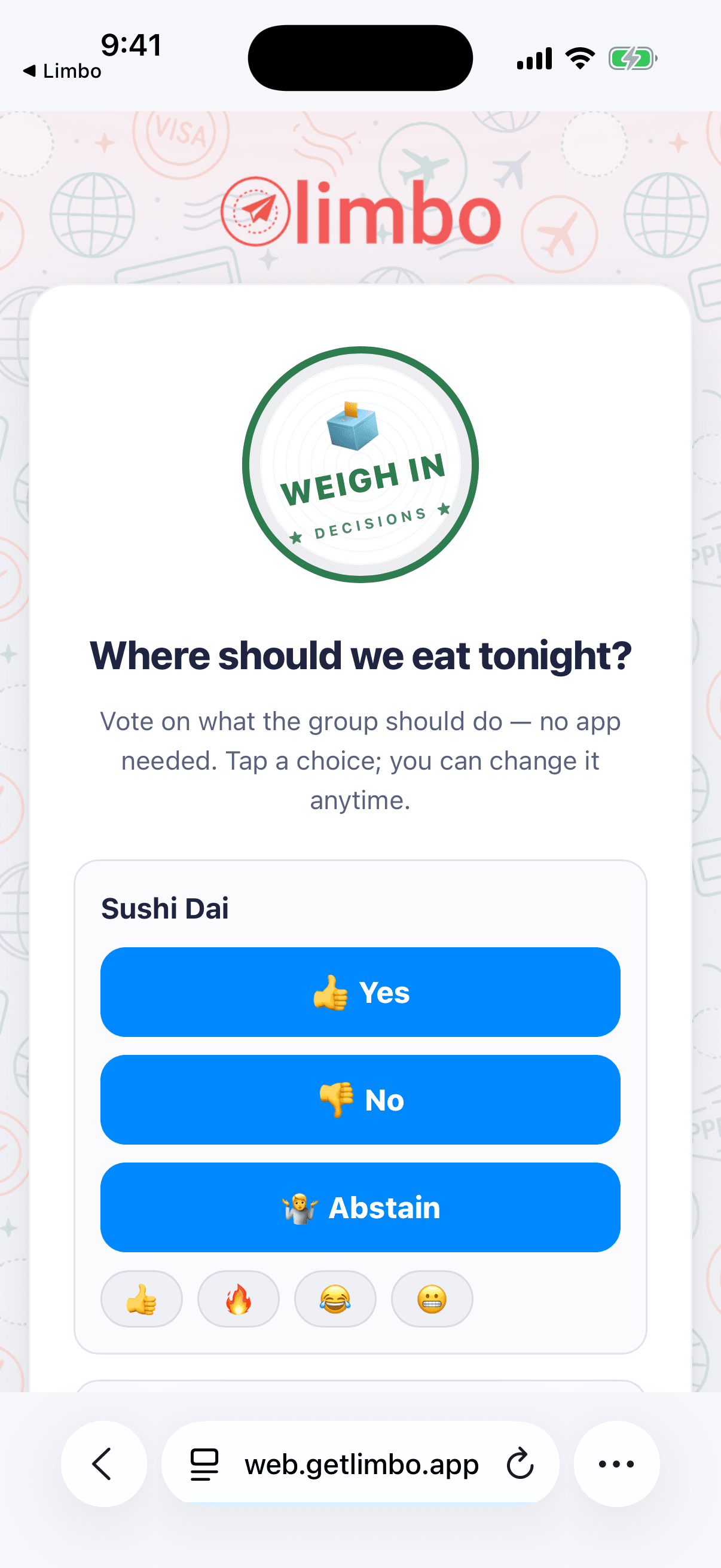
The web ballot works just like the app's: three choices, one tap.
- 1Tap the button in your weigh-in email to open the ballot on web.getlimbo.app.
- 2Read the plan, then tap Yes, No, or Abstain.
- 3Changed your mind? Open the link again and tap a different choice any time before the deadline.
Tip
In the app, votes work in airplane mode when the server-controlled Pro offline-access capability is enabled and the account has recent verification. A browser vote always needs a connection, but there's nothing to install and nothing to log in to. Whichever way you vote, it's the same ballot and the same result.
React with an emoji
Beyond your vote, the web ballot lets you drop an emoji reaction, a quick way to add a "🔥" or a "😬" without committing to a Yes or No. Reactions are visible to everyone voting from a link and are a light-touch way to read the room while the ballot is still open. They don't count toward the tally; they're just colour.
Email me the result
Sealed ballots don't show the outcome until the reveal, so you won't watch the result roll in from the browser. Instead, tap Email me the result on the ballot. Limbo sends you the verdict, approved or rejected, with the final tally, the moment the ballot closes. No need to keep the tab open or check back.
What you can and can't see from the link
The web ballot follows the exact same privacy rules as the app, so nobody gets an edge by voting from a browser:
- You can see the trip name, each open proposal, your own vote, and everyone's emoji reactions.
- You can't see the running tally while the ballot is sealed. Yes / No / Abstain counts stay hidden for everyone until the reveal, in the browser exactly as in the app. That's what stops bandwagon voting.
- On an anonymous ballot, the reveal shows the counts only, never who voted which way. The full breakdown of sealed and anonymous behaviour is in Sealed and anonymous ballots.
When the ballot resolves, the same link (or your result email) shows the reveal: the verdict stamp, the final tally, and the turnout. To see who voted for what, open the ballot in the app. See The reveal.
Note
Want the full picture, every ballot for the trip, deadlines, and the reveal in one place? Install Limbo and sign in, and your web votes are already there under your name. Voting from the link never leaves you out.
Related articles
Start a ballot on the web
Spin up a group vote from any browser at web.getlimbo.app/new, no app, no account, share one link, and let the crew pick the winner.
How group voting works
Turn plans into proposals, vote yes, no, or abstain, and see the reveal when the ballot closes.
Sealed and anonymous ballots
Hide the running tally until the reveal with sealed votes, or hide who voted for what with anonymous voting.
The reveal
What happens when a ballot resolves: the verdict stamp, the tally bars, who voted for what, who sat it out, and sharing the result.