Claim, assign, and reassign
Every crew member can grab an open task with "I'll do it"; editors can assign, reassign, or put work back up for grabs.
Every task in the Checklist has an owner, or is waiting for one. You can grab a task for yourself, hand one to a specific crew member, swap who's on it, or put it back up for grabs, all from the task row.
Who can do what: every joined crew member can claim an open task for themselves. member Assigning, reassigning, or setting a task back to Unassigned needs edit access: organizers and the owner always have it, plus any crew the owner has granted edit rights. organizer
Claiming a task for yourself
On a task that's still Up for grabs, claiming it is one tap.
- 1Find an up-for-grabs task in the list.
- 2Tap the red I'll do it button (with the hand icon) on the right of the row.
- 3The task flips to Claimed and your avatar appears on it.
A self-claim never sends a notification, you already know you grabbed it.

Assigning to a crew member
To hand a task to someone else, or to change who's on a claimed one, use the owner chip.
- 1On a claimed or done task, tap the owner avatar chip (it carries a down-chevron caret).
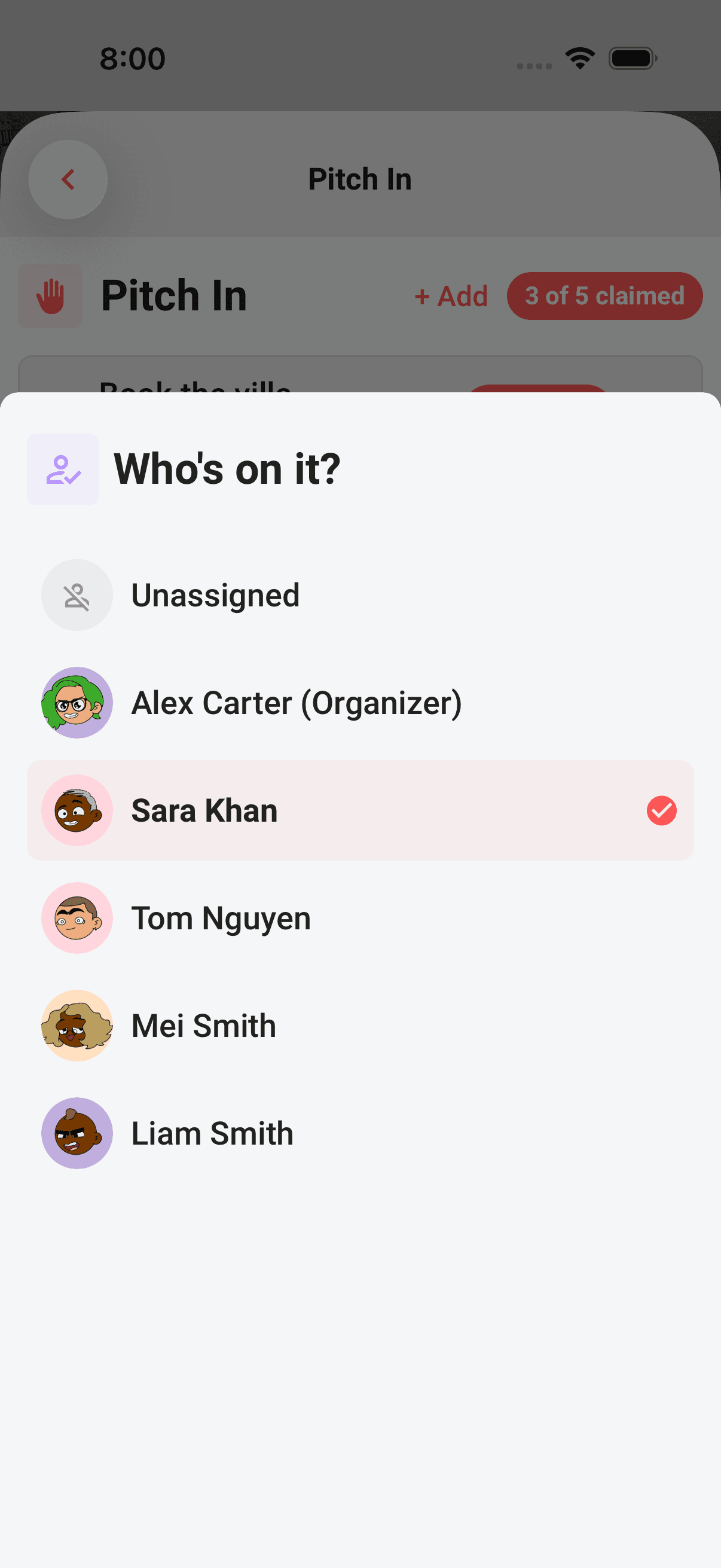
- 2The Who's on it? sheet opens, listing the trip's crew.
- 3Tap the person you want on it.
The sheet shows every joined crew member, with the trip owner marked "(Organizer)" and the current owner's row carrying a red check. There's also a top Unassigned row, and any crew members who've been invited but haven't joined yet appear greyed out at 50% with a "Haven't joined yet" hint, they have no account to notify, so they can't own a task.
Reassigning
Reassigning is the same move: tap the owner chip, open Who's on it?, and pick a different crew member. The task keeps its status (claimed stays claimed, done stays done) and just changes hands.
Re-picking the person who already owns it is a silent no-op, Limbo won't fire a duplicate notification.
Unclaiming: back up for grabs
To hand a task back to the whole crew, set it to Unassigned.
- 1Tap the owner chip to open the Who's on it? sheet.
- 2Tap the Unassigned row at the top.
- 3The task loses its owner.
What happens next depends on where the task was:
- A claimed task returns to Up for grabs, anyone can grab it again with I'll do it.
- A done task stays Done, just with no owner recorded.
Who gets notified
Notifications follow one simple rule: Limbo only pings a person when you put work on them:
| Action | Notification |
|---|---|
| You claim a task yourself (I'll do it) | None |
| You assign a task to another crew member | They get a "<name> assigned you a task" push |
| You reassign to the person who already owns it | None (silent no-op) |
| You set a task to Unassigned | None |
Note
Invited crew members who haven't joined the trip yet can't be assigned a task, there's no account to notify, which is why they show greyed out with "Haven't joined yet" in the sheet.
Tip
Where the server-controlled Pro offline-access capability is enabled, active Pro with recent verification can claim tasks and use editor-only assignment actions without a connection. Your change shows up instantly and queues on your phone; when you're back online it syncs, and any assignment notification goes out then. If someone else claimed the same open task first, Limbo tells you and refreshes the row to show its current owner. See Mark tasks done and reopen for more on offline.
Permissions
- See who's on each task: every crew member on the trip. member
- Claim an open task for yourself: every joined crew member. member
- Assign, reassign, and unclaim: organizers and crew with edit permission. organizer
- Grant another crew member edit access: the trip owner. owner
Related articles
Divvy up the work
Checklist is your trip's shared to-do list, add the big jobs, sort them into groups or start from a template, and watch every task move from up-for-grabs to done.
Mark tasks done and reopen
Assignees can finish and reopen their own tasks; editors can manage every task and remove work the crew no longer needs.
How group voting works
Turn plans into proposals, vote yes, no, or abstain, and see the reveal when the ballot closes.